最近死了么,挺火的,用ai写了个活着么,短信自己配置就行,保存到本地.html就可以有大佬可以优化一下短信服务
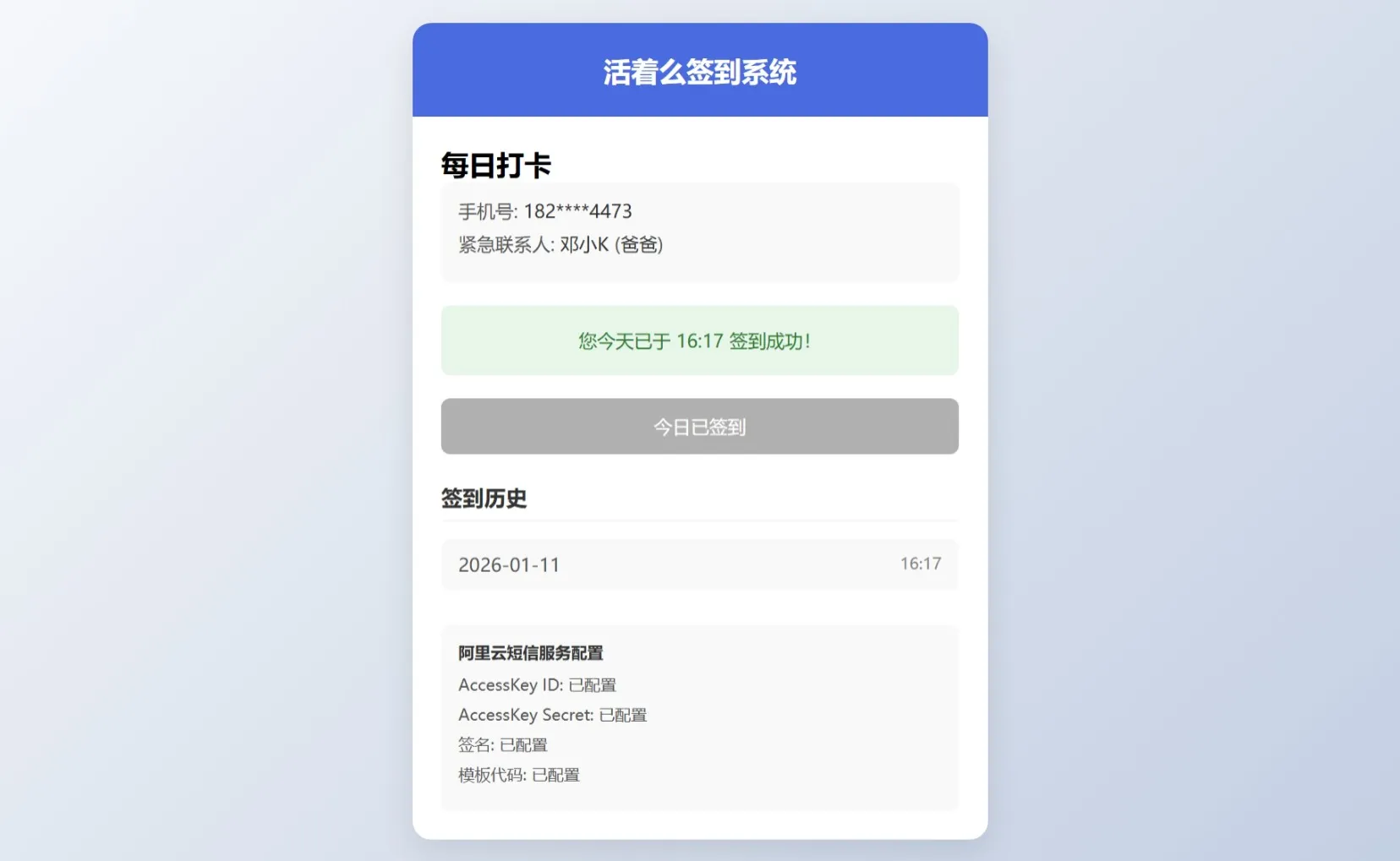
<!DOCTYPE html><html lang="zh-CN"><head> <meta charset="UTF-8"> <meta name="viewport" content="width=device-width, initial-scale=1.0"> <title>活着么签到系统</title> <style> * { margin: 0; padding: 0; box-sizing: border-box; font-family: 'PingFang SC', 'Microsoft YaHei', sans-serif; } body { background: linear-gradient(135deg, #f5f7fa 0%, #c3cfe2 100%); min-height: 100vh; display: flex; justify-content: center; align-items: center; padding: 20px; } .container { width: 100%; max-width: 500px; background: white; border-radius: 16px; box-shadow: 0 10px 30px rgba(0, 0, 0, 0.1); overflow: hidden; } .header { background: #4a6bdf; color: white; padding: 25px 20px; text-align: center; } .header h1 { font-size: 24px; font-weight: 600; } .form-container { padding: 25px; } .form-group { margin-bottom: 20px; } .form-group label { display: block; margin-bottom: 8px; font-weight: 500; color: #333; } .form-group input { width: 100%; padding: 14px; border: 1px solid #ddd; border-radius: 8px; font-size: 16px; transition: border-color 0.3s; } .form-group input:focus { border-color: #4a6bdf; outline: none; box-shadow: 0 0 0 2px rgba(74, 107, 223, 0.2); } .btn { width: 100%; padding: 14px; background: #4a6bdf; color: white; border: none; border-radius: 8px; font-size: 16px; font-weight: 500; cursor: pointer; transition: background 0.3s; } .btn:hover { background: #3a5bce; } .btn:disabled { background: #b0b0b0; cursor: not-allowed; } .view { display: none; } .view.active { display: block; animation: fadeIn 0.3s ease; } @keyframes fadeIn { from { opacity: 0; } to { opacity: 1; } } .user-info { background: #f9f9f9; padding: 15px; border-radius: 8px; margin-bottom: 20px; } .user-info p { margin-bottom: 8px; color: #555; } .user-info span { font-weight: 500; color: #333; } .checkin-status { text-align: center; padding: 20px; border-radius: 8px; margin-bottom: 20px; font-weight: 500; } .checked-in { background: #e8f5e9; color: #2e7d32; } .not-checked-in { background: #fff3e0; color: #ef6c00; } .history { margin-top: 25px; } .history h3 { margin-bottom: 15px; color: #333; padding-bottom: 8px; border-bottom: 1px solid #eee; } .history-list { max-height: 200px; overflow-y: auto; } .history-item { padding: 12px 15px; background: #f9f9f9; border-radius: 8px; margin-bottom: 10px; display: flex; justify-content: space-between; } .history-date { color: #555; } .history-time { color: #888; font-size: 14px; } .alert { padding: 15px; border-radius: 8px; margin-bottom: 20px; font-size: 14px; } .alert-warning { background: #fff3e0; color: #ef6c00; border-left: 4px solid #ff9800; } .alert-info { background: #e3f2fd; color: #1565c0; border-left: 4px solid #2196f3; } .sms-config { background: #f9f9f9; padding: 15px; border-radius: 8px; margin-top: 20px; font-size: 14px; } .sms-config h4 { margin-bottom: 10px; color: #333; } .sms-config p { margin-bottom: 8px; color: #555; } [url=home.php?mod=space&uid=945662]@media[/url] (max-width: 600px) { .container { border-radius: 12px; }
.header { padding: 20px 15px; }
.form-container { padding: 20px 15px; } } </style></head><body> <div class="container"> <div class="header"> <h1>活着么签到系统</h1> </div> <!-- 注册视图 --> <div id="register-view" class="view active"> <div class="form-container"> <h2>手机号注册</h2> <div class="alert alert-info"> 请输入您的手机号进行注册,注册后需要设置紧急联系人才能开始签到 </div> <div class="form-group"> <label for="phone">手机号</label> <input type="tel" id="phone" placeholder="请输入11位手机号" pattern="[0-9]{11}" required> </div> <button id="register-btn" class="btn">注册</button> </div> </div> <!-- 紧急联系人视图 --> <div id="emergency-contact-view" class="view"> <div class="form-container"> <h2>设置紧急联系人</h2> <div class="alert alert-warning"> 紧急联系人不能是自己,建议填写直系亲属信息 </div> <div class="form-group"> <label for="contact-name">联系人姓名</label> <input type="text" id="contact-name" placeholder="请输入联系人姓名" required> </div> <div class="form-group"> <label for="contact-phone">联系人手机号</label> <input type="tel" id="contact-phone" placeholder="请输入11位手机号" pattern="[0-9]{11}" required> </div> <div class="form-group"> <label for="relationship">与您的关系</label> <input type="text" id="relationship" placeholder="例如:父亲、母亲、配偶等" required> </div> <button id="set-contact-btn" class="btn">完成设置</button> </div> </div> <!-- 主视图 --> <div id="main-view" class="view"> <div class="form-container"> <h2>每日打卡</h2> <div class="user-info"> <p>手机号: <span id="user-phone"></span></p> <p>紧急联系人: <span id="emergency-contact"></span> (<span id="contact-relationship"></span>)</p> </div> <div id="checkin-status" class="checkin-status not-checked-in"> 今日尚未签到,请点击下方按钮签到 </div> <button id="checkin-btn" class="btn">今日签到</button> <div class="history"> <h3>签到历史</h3> <div id="history-list" class="history-list"> <!-- 签到历史将在这里显示 --> </div> </div> <div class="sms-config"> <h4>阿里云短信服务配置</h4> <p>AccessKey ID: <span id="access-key-id">已配置</span></p> <p>AccessKey Secret: <span id="access-key-secret">已配置</span></p> <p>签名: <span id="sms-sign">已配置</span></p> <p>模板代码: <span id="template-code">已配置</span></p> </div> </div> </div> </div> <script> document.addEventListener('DOMContentLoaded', function() { // 初始化数据 let userData = { phone: '', emergencyContact: { name: '', phone: '', relationship: '' }, checkInHistory: [], lastCheckInDate: null };
// 从localStorage加载数据 function loadData() { const savedData = localStorage.getItem('checkInData'); if (savedData) { userData = JSON.parse(savedData); updateUI(); } }
// 保存数据到localStorage function saveData() { localStorage.setItem('checkInData', JSON.stringify(userData)); }
// 更新UI function updateUI() { if (userData.phone && !userData.emergencyContact.name) { showView('emergency-contact-view'); } else if (userData.phone && userData.emergencyContact.name) { showView('main-view'); updateMainView(); } else { showView('register-view'); } }
// 显示指定视图 function showView(viewId) { document.querySelectorAll('.view').forEach(view => { view.classList.remove('active'); }); document.getElementById(viewId).classList.add('active'); }
// 更新主视图 function updateMainView() { document.getElementById('user-phone').textContent = userData.phone.replace(/(\d{3})\d{4}(\d{4})/, '$1****$2'); document.getElementById('emergency-contact').textContent = userData.emergencyContact.name; document.getElementById('contact-relationship').textContent = userData.emergencyContact.relationship; // 更新签到状态 const today = new Date().toISOString().split('T')[0]; const hasCheckedIn = userData.checkInHistory.some(record => record.date === today); const checkinStatus = document.getElementById('checkin-status'); const checkinBtn = document.getElementById('checkin-btn'); if (hasCheckedIn) { checkinStatus.textContent = `您今天已于 ${userData.checkInHistory.find(r => r.date === today).time} 签到成功!`; checkinStatus.className = 'checkin-status checked-in'; checkinBtn.textContent = '今日已签到'; checkinBtn.disabled = true; } else { checkinStatus.textContent = '今日尚未签到,请点击下方按钮签到'; checkinStatus.className = 'checkin-status not-checked-in'; checkinBtn.textContent = '今日签到'; checkinBtn.disabled = false; } // 更新签到历史 const historyList = document.getElementById('history-list'); historyList.innerHTML = ''; if (userData.checkInHistory.length === 0) { historyList.innerHTML = '<div class="history-item">暂无签到记录</div>'; } else { // 按日期降序排列 const sortedHistory = [...userData.checkInHistory].sort((a, b) => new Date(b.date) - new Date(a.date)); sortedHistory.forEach(record => { const item = document.createElement('div'); item.className = 'history-item'; item.innerHTML = ` <div> <div class="history-date">${record.date}</div> </div> <div class="history-time">${record.time}</div> `; historyList.appendChild(item); }); } // 检查连续未签到天数 checkConsecutiveMissedDays(); }
// 检查连续未签到天数 function checkConsecutiveMissedDays() { if (!userData.lastCheckInDate) return; const lastCheckIn = new Date(userData.lastCheckInDate); const today = new Date(); today.setHours(0, 0, 0, 0); const diffTime = Math.abs(today - lastCheckIn); const diffDays = Math.ceil(diffTime / (1000 * 60 * 60 * 24)); if (diffDays >= 3) { // 模拟发送短信 sendSMSNotification(diffDays); } }
// 模拟发送短信通知 function sendSMSNotification(daysMissed) { // 在实际应用中,这里会调用阿里云短信API console.log(`正在发送短信通知紧急联系人 ${userData.emergencyContact.name} (${userData.emergencyContact.phone})`); console.log(`短信内容: 您的亲属 ${userData.phone.replace(/(\d{3})\d{4}(\d{4})/, '$1****$2')} 已连续 ${daysMissed} 天未签到,请及时联系确认安全。`); alert(`模拟短信发送成功!\n\n已向紧急联系人 ${userData.emergencyContact.name} (${userData.emergencyContact.phone}) 发送通知:\n"您的亲属已连续 ${daysMissed} 天未签到,请及时联系确认安全。"`); // 重置计数器(在实际应用中,可能需要更复杂的逻辑) userData.lastCheckInDate = new Date().toISOString().split('T')[0]; saveData(); }
// 注册按钮点击事件 document.getElementById('register-btn').addEventListener('click', function() { const phone = document.getElementById('phone').value; if (!/^\d{11}$/.test(phone)) { alert('请输入有效的11位手机号!'); return; } userData.phone = phone; saveData(); updateUI(); });
// 设置紧急联系人按钮点击事件 document.getElementById('set-contact-btn').addEventListener('click', function() { const name = document.getElementById('contact-name').value; const phone = document.getElementById('contact-phone').value; const relationship = document.getElementById('relationship').value; if (!name || !/^\d{11}$/.test(phone) || !relationship) { alert('请填写完整的紧急联系人信息!'); return; } if (phone === userData.phone) { alert('紧急联系人不能是自己!'); return; } userData.emergencyContact = { name, phone, relationship }; saveData(); updateUI(); });
// 签到按钮点击事件 document.getElementById('checkin-btn').addEventListener('click', function() { const today = new Date().toISOString().split('T')[0]; const now = new Date(); const time = now.toTimeString().split(' ')[0].substring(0, 5); // 检查今天是否已经签到 const hasCheckedIn = userData.checkInHistory.some(record => record.date === today); if (hasCheckedIn) { alert('您今天已经签到过了!'); return; } // 添加签到记录 userData.checkInHistory.push({ date: today, time: time }); // 更新最后签到日期 userData.lastCheckInDate = today; saveData(); updateUI(); alert('签到成功!'); });
// 初始化应用 loadData();
// 每天检查一次连续未签到情况(在实际应用中,这应该在后端完成) setInterval(checkConsecutiveMissedDays, 24 * 60 * 60 * 1000); }); </script></body></html>复制代码
|